
Free post-calculation tool
CNC planned versus actual cost comparison
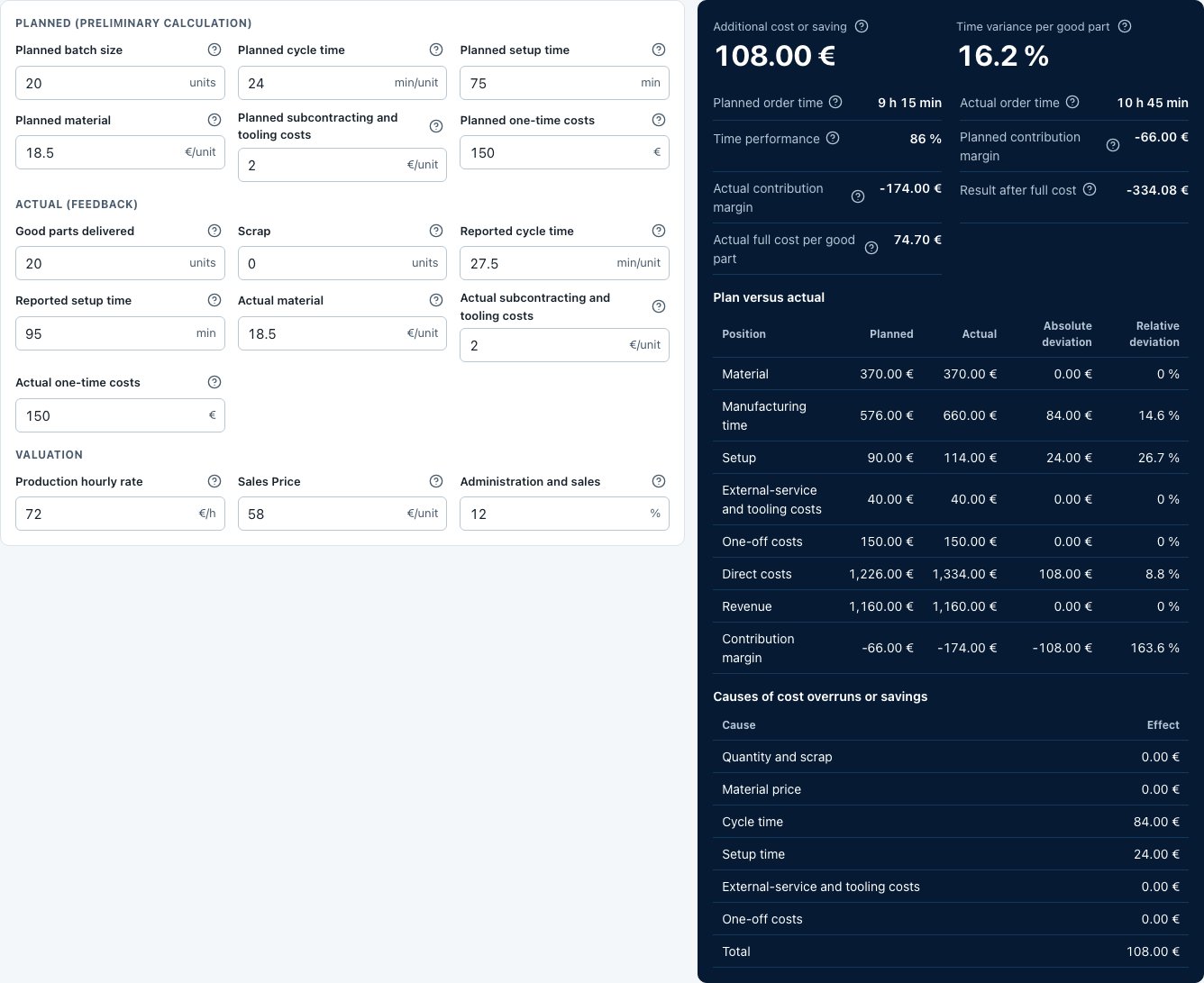
After production, compare the planned costs with the actual effort. The free calculator shows how changed times and costs affect the job result.
Use comparable values
Relate planned and actual figures to the same quantity and scope. Separate setup, cycle time, material and additional services. Otherwise a change in delivery quantity can appear to be a cost variance.
Translate time differences into costs
Worked example: two extra machining minutes per part at €90/h add €3 per part. For 50 parts the difference is €150. Then decide whether its cause should be reflected in future quotes.
Feed the cause back into planning
Distinguish one-off disruptions from underestimated operations. Check tool changes, rework and measurement effort as well. One deviation is not a general new planning value for unrelated parts.
Frequently asked questions
Are machine data imported automatically?
You enter planned and actual values in the public calculator. Automatic machine or production data collection is neither required nor promised.
Is selling price the same as contribution?
No. Contribution is calculated after deducting the relevant costs. Check which cost basis your comparison uses.